
Normalizing Phone Numbers to E.164 in BigQuery for Lookup
To normalize phone numbers to E.164 in BigQuery before a carrier lookup, preserve the raw column, strip presentation characters in a working column, and ad
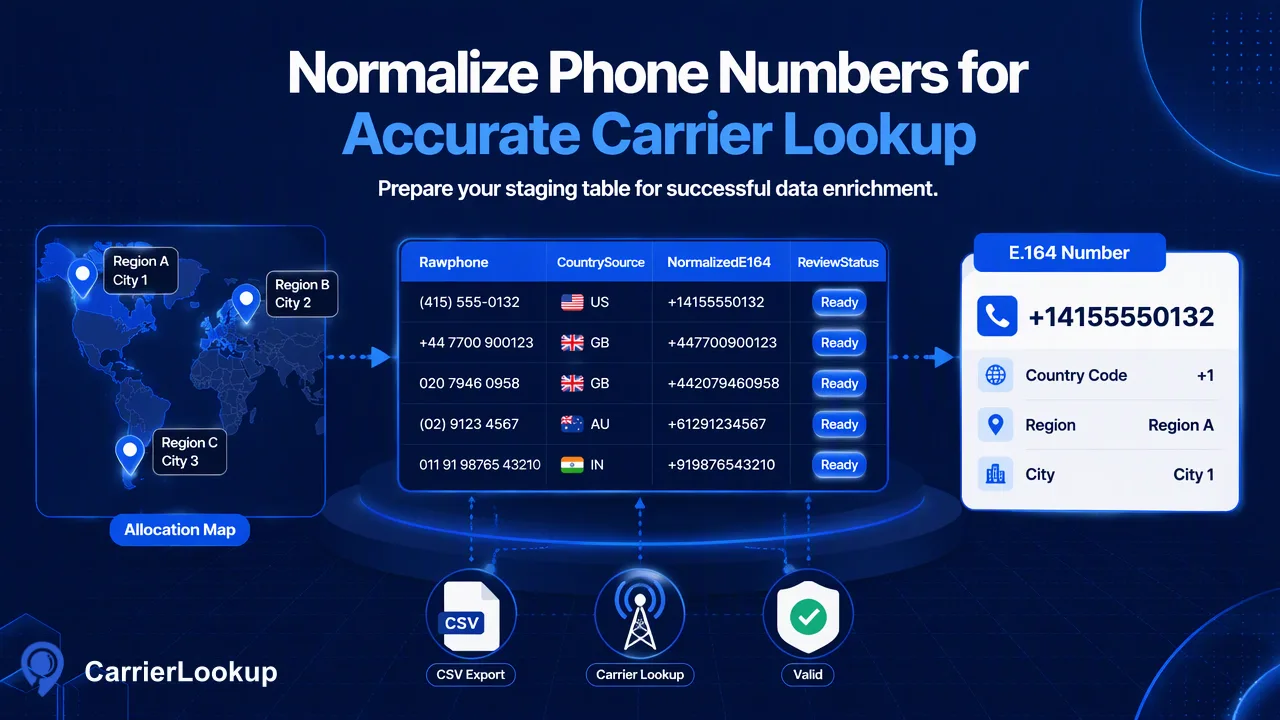
To normalize phone numbers to E.
To normalize phone numbers to E.164 in BigQuery before a carrier lookup, preserve the raw column, strip presentation characters in a working column, and add a country code only when an authoritative country field supports that choice. Keep a leading plus sign for CarrierLookup realtime requests. For a one-country file task, export country-coded digits and reconcile the returned CSV using a stable key.
Preserve the original number and its country evidence
Do not overwrite the only copy of a phone number during cleanup. Create separate columns for the raw value, source country, normalized candidate, and a reason for rejection or manual review. A source may contain a national dialing prefix, a local format, or a country code written inconsistently. A regular expression can remove punctuation, but it cannot decide what country a number belongs to. That decision needs a trustworthy country field or other authorized source evidence.
The ITU E.164 recommendation defines the international numbering structure. CarrierLookup realtime checks require a leading +, country code, and subscriber number without spaces or separators. A candidate that merely looks like digits is not automatically a valid number. Keep uncertain values out of the lookup set until a human or a validated numbering rule resolves them.
Plan the export shape at the beginning. Realtime multi requests can include numbers from different countries and return in input order. CarrierLookup's bulk file task accepts numbers from one selected country. Split a mixed-country dataset by reliable country assignment before preparing files; do not choose a country from the first few digits alone.
Use BigQuery functions for mechanical cleanup
Google's BigQuery string-function reference documents REGEXP_REPLACE, REGEXP_CONTAINS, and related functions. Use them for mechanical transformations such as removing spaces, parentheses, and hyphens from a copy of the source value. A simple expression like REGEXP_REPLACE(raw_phone, r'[^0-9+]', '') can create an inspection candidate, but it can also preserve an unexpected internal plus sign. Follow it with a format test and a quarantine path rather than sending every output to the API.
For data already stored with a trustworthy leading plus sign and country code, a candidate expression can strip separators while retaining that plus sign. For local numbers, use a country-specific normalization rule reviewed against current numbering guidance. A generic “prepend the CRM country code” rule is risky when the original value already includes a country code or a trunk prefix. Document the specific transformation applied to each source type and sample the output before export.
A practical staging table contains raw_phone, country_source, normalized_e164, normalization_rule, and review_status. Build the lookup input only from rows marked ready. This keeps a rejected format from being mistaken for a no-carrier result and makes corrections reversible.
Prepare the realtime multi path
For a small ready set, export E.164 strings such as + followed by country-coded digits to the REST multi workflow. The POST /api/v1/batch-check endpoint accepts 1–100 numbers and returns an ordered synchronous result. Store a positional mapping from request element to source row key before sending the call. Do not rely on identical phone values alone when the CRM contains duplicates.
Read each returned item's identifier and exists status. exists=false means the item has no normal result; it is not a statement that the number is disconnected. A successful result may contain carrier, underlying carrier, number type, country code, region, and city, with optional fields empty. Keep each outcome's check time and input association in the staging table.
The single check uses the same E.164 form when an operator needs to inspect one record. Authenticate from a trusted server using the documented X-API-Key header. This workflow gives data teams a way to test normalization on a sample before sending a much larger prepared list.
Prepare one-country file tasks
For a large list, make a one-column TXT or CSV with one country-coded number per line and select the corresponding ISO country for the bulk task. The documented input must belong to that selected country. In multipart submission, the country field must precede the file. Bulk preparation removes invalid rows, duplicates, rows without a country code, and numbers outside the selected country. Inspect the preparation counts before treating the source export as fully processed.
The bulk task is asynchronous: submit with POST /api/v1/bulk-tasks, save the task ID, and query GET /api/v1/bulk-tasks/{id} no more often than every 30 seconds. A successful task provides one CSV. It reports the identifier as plain country-coded digits without a plus sign. That differs from the realtime request form, so do not join the result to a raw phone field by direct string equality.
Build a normalized digits-only join key from each accepted E.164 candidate, and retain the source row key separately. If the input contains duplicate numbers, the bulk preparation can collapse them; decide whether one result should be associated with several source records. Reconcile unmatched, invalid, and duplicate source rows outside the result CSV.
Review the joined data before CRM updates
The resulting carrier describes original allocation, not the currently serving carrier after porting. Region and city are allocation geography rather than live location. Put these descriptions in the data dictionary so analysts do not mistake a field name for proof of where a person is now. A code=0 completed realtime result can have empty optional carrier fields; keep empties as unavailable instead of generating a negative label.
Sample joined rows from several source systems and countries. Check that the raw number, normalized E.164 form, plain-digit key, and result identifier refer to the same input. Investigate mismatches in the staging table before writing values to the CRM. Keep the lookup timestamp, since allocation context can be revisited later and the source record itself may change.
This pipeline separates three jobs: BigQuery cleans a known representation, CarrierLookup supplies documented allocation fields, and the CRM team decides whether and how to update the contact. That division makes errors visible and keeps the carrier result within its proper meaning.
FAQ
How can teams strip phone separators in BigQuery?
Use a working copy and documented string functions such as REGEXP_REPLACE, then validate the candidate against the expected E.164 shape.
How can teams assign a country code to a local number?
Use a reliable country field and a reviewed country-specific rule. Quarantine rows whose country or dialing form is ambiguous.
How can teams join a bulk CSV to E.164 input?
Create a stable digits-only key from accepted E.164 candidates and reconcile it with the bulk CSV identifier, while preserving source row IDs.
How can teams handle a mixed-country list?
Use realtime multi requests for a small mixed-country set or split large files by trusted country assignment before bulk submission.
Learn More
Choose the product information that fits the next step in your workflow.