
Partition a Mixed-Country Phone List into Carrier Lookup Tasks
Build a country-to-file manifest, review excluded numbers, and submit separate carrier lookup bulk tasks with traceable results.
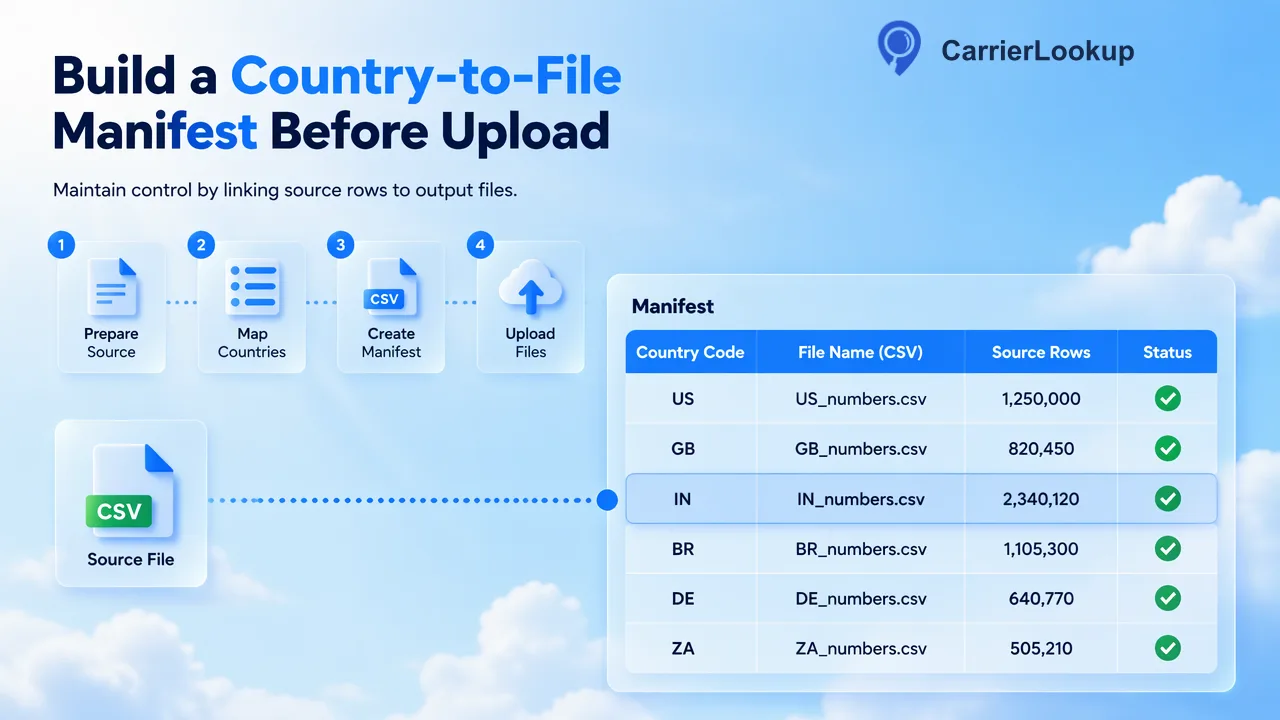
A country-to-file manifest turns a mixed CRM export into reviewed country-specific carrier lookup tasks.
To partition a mixed-country phone list for CarrierLookup bulk tasks, preserve the source export, parse each number into an international form, group eligible rows by the selected ISO country, and write one reviewed TXT or CSV per country. Keep a manifest linking every output file to its country, input rows, exclusions, and later result. CarrierLookup’s bulk service processes a selected-country file; it does not split a mixed export for the team.
Begin with the source list and its country evidence
A CRM market field is not enough to place a number into a bulk task. A customer may live in one country and retain a number from another. Start from the phone number's international country code, and keep the original CRM country or market as a separate business field. The ITU E.164 recommendation defines the international numbering structure; it also recognizes numbering codes that cover an integrated plan rather than a simple one-country label. Use a maintained numbering parser and inspect ambiguous rows rather than assigning a country from the first digit or a spreadsheet column alone.
Read phone identifiers as text. Spreadsheet software and CSV readers can otherwise alter leading characters or infer numeric types. For example, pandas read_csv documentation describes explicit dtype and chunked reading. A team using another tool needs the same properties: text-preserving import and a repeatable way to handle a large export without silently changing identifiers.
Keep the untouched source file and a local row reference. If a phone value lacks an international country code, do not guess one merely to make the row pass bulk acceptance. Mark it for source-data review. A row rejected before submission should remain visible in the acceptance report, even though it never appears in a CarrierLookup result file.
Build a country-to-file manifest before upload
Create a manifest with one row per intended output file. Suggested customer-owned fields are selected ISO country, output filename, source export date, source-row count, prepared unique-number count, excluded-row count, reviewer, and a file checksum. Keep a separate sidecar from each canonical number back to every original contact row. These are local controls, not fields in CarrierLookup’s response or CSV.
Partition only prepared country-coded numbers into one-column TXT or CSV files. The CarrierLookup API documentation identifies a selected country for the Global carrier lookup bulk service, while realtime single and multi lookups accept numbers from different countries. This distinction is why a mixed export needs preparation for bulk but may be handled differently in a smaller realtime workflow.
The manifest should also state the reason a row was excluded: missing country code, unparseable number, duplicate prepared identifier, or country not included in the current run. Duplicates may represent several legitimate source contacts. Deduplicate the submission key while preserving every source-row relationship in the sidecar; after a successful result, the team can deliberately map the allocation context back to each corresponding record.
Run an acceptance report for every country partition
Before submission, compare each file with the manifest. Check that every line contains one country-coded number, that the selected country is consistent with the prepared rows, and that no header or CRM column slipped into the one-column file. The file should be essentially for the selected country under the current service rules. Do not state a fixed row or file-size threshold from memory; check the live bulk product information and API documentation for the current acceptance limits.
An acceptance report can show four totals: source rows considered, rows held for data repair, unique identifiers written, and duplicate source rows represented through the sidecar. Recompute those totals from the files rather than copying them from an earlier export. A manifest that says one country while its file contains another is a preventable operational error; have a reviewer compare the file and the selected country before submission.
Treat a small country partition as a decision point. If it does not meet current bulk acceptance rules, hold it or use a documented realtime workflow where suitable. Do not pad it with repeated numbers. CarrierLookup has a synchronous Original Carrier Lookup for individual numbers and multi-number requests, plus a separate asynchronous Global carrier lookup file service. They are different workflows, and the team should choose based on the actual partition and current product limits.
Submit and monitor each task separately
For each approved partition, submit the file with the matching selected country and record the returned task reference in the manifest. Do not attach one country's file to another country's task simply because the filenames look similar. The CarrierLookup API reference documents the bulk submission and task-status endpoints; current API rules should govern upload details and polling. Bulk processing is asynchronous, so an accepted upload is not a completed carrier result.
Track each task independently as processing, success, or failed. A task that fails during preparation may have excluded invalid, duplicate, countryless, or out-of-country rows and may still fail another acceptance condition. Preserve its manifest and error for repair. Do not infer carrier values from a failed task or from the source number prefix. A successful task provides one CSV for its prepared numbers, which should be stored alongside the corresponding manifest and sidecar.
After download, check that the file belongs to the intended task and selected country. Bulk identifiers are plain digits with their country code, without a plus sign or spaces. Normalize the customer-owned comparison key on both sides while retaining the raw files. The result describes the originally allocated carrier, underlying carrier, line type, and number-range geography where available; it is not a current carrier after porting or a person's live location.
Reconcile results without losing source contacts
Join the returned identifiers to the sidecar, not to the original CSV row positions. Bulk preprocessing can remove duplicate and invalid entries, so row order is not a trustworthy join key. Produce counts for returned identifiers, unmatched prepared identifiers, and returned identifiers that do not match the manifest. Stop any automatic CRM update for unexpected keys until an operator investigates.
For a number shared by multiple source rows, map one completed lookup to those rows deliberately and retain the same observation time and task reference. If a contact's number changed after export, mark a conflict rather than overwriting its current data. Optional version checks are a customer integration choice, not a product feature. Keep empty carrier fields as unavailable allocation information rather than recoding them as an invalid or unreachable number.
The final action is to submit a reviewed country-specific file through Global carrier lookup and save its manifest with the result. This gives CRM operators a traceable path from mixed source export to separate tasks and back, without claiming that allocation data proves present network, contactability, identity, or consent.
FAQ
Can CarrierLookup bulk automatically split a mixed-country CSV?
No such splitting is documented. Prepare country-specific files and select the corresponding country for each task.
What should happen to numbers with missing country codes?
Hold them for source-data review. Do not invent a country code to make the upload pass.
Should results be joined to the original export by row number?
No. Use the returned identifier and a customer-owned sidecar that maps each prepared number to its source rows.
Learn More
Choose the product information that fits the next step in your workflow.