
E.164 Format Phone Numbers: How to Format Numbers for a Carrier Lookup
Convert local phone numbers to E.164 format before a carrier lookup: examples, common mistakes, and how realtime input differs from bulk file rows.
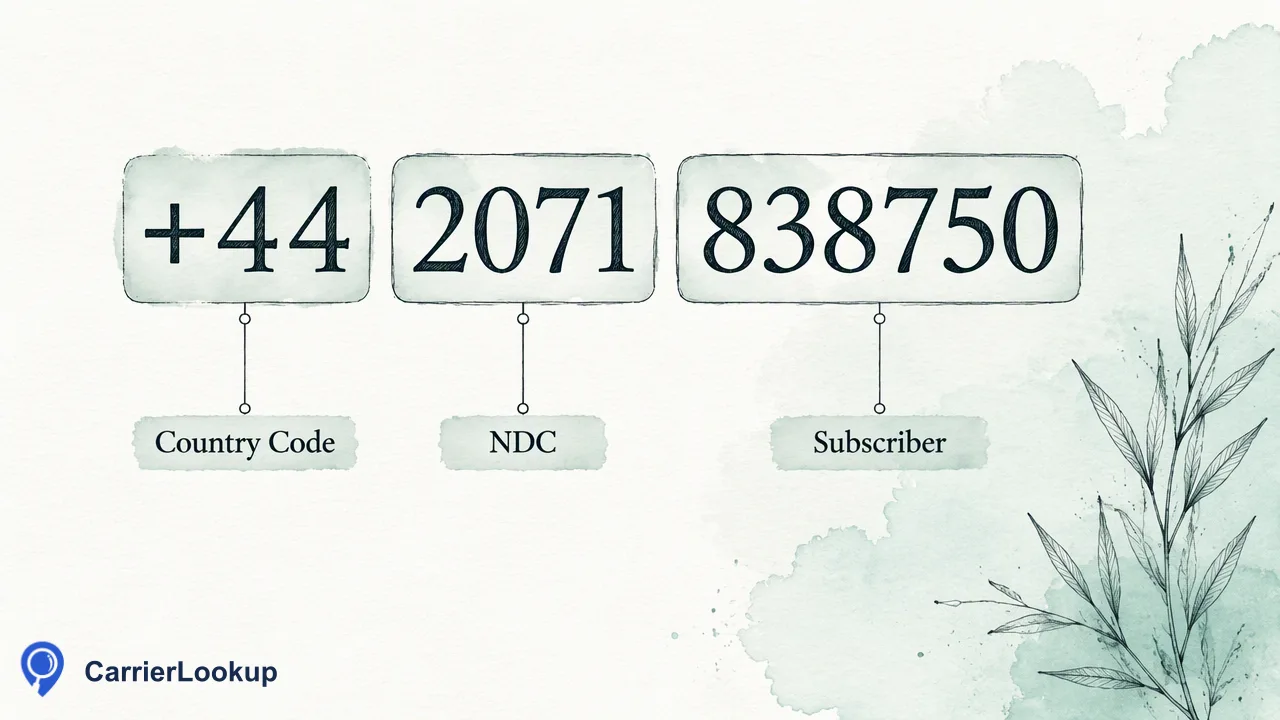
A practical guide to writing E.164 format phone numbers, converting local formats, and preparing realtime and file inputs for CarrierLookup.
An E.164 format phone number is written with a leading plus sign, the country code and the subscriber number, with no spaces, dashes or brackets, for example +442071838750. International standard E.164 caps the total at 15 digits. For a carrier lookup, convert every local number to this form first, dropping any national trunk prefix such as a leading zero. CarrierLookup realtime checks expect the leading plus. Bulk file rows use the same digits without the plus sign, one number per line. A number rejected for its format is a formatting problem to fix, not a no-carrier result.
What E.164 format means
E.164 is the international numbering plan published by the ITU. A number in this plan has up to three parts: a country code of one to three digits, a national destination code, and the subscriber number. Written out, it becomes a plus sign followed by digits only. The total length is capped at 15 digits.
The plus sign is notation for the international call prefix. The prefix you dial from a landline or phone differs by country, which is why the standard writes a plus instead of any one prefix.
| Part | Example | Notes |
|---|---|---|
| Plus sign | + | Always first |
| Country code | 44 | One to three digits |
| National number | 2071838750 | Without the trunk prefix |
| Result | +442071838750 | No spaces or separators |
Treat E.164 as the single storage format for phone numbers. Display formats such as brackets and spaces are fine for people, but they belong in a presentation layer and not in the field you send to a lookup.
Converting local formats step by step
Most messy phone columns follow a few patterns. Work through them in this order.
- Remove everything that is not a digit or a leading plus. Spaces, dots, dashes and brackets all go.
- Replace a leading international dialling prefix. A number that starts with 00 followed by the country code becomes a plus followed by the country code.
- Drop the national trunk prefix. Many countries write local numbers with a leading zero that is not part of the international number. A UK mobile written as 07911 123456 becomes +447911123456, while a US number written (212) 555-0123 becomes +12125550123 once the country code 1 is added.
- Add the country code when it is missing. Only do this when you know the country from another field, such as the billing address or the form the contact came from. Guessing the country adds mistakes you cannot see later.
- Check the length. An empty result, or a result longer than 15 digits, needs review, not a lookup.
Run this as a repeatable script or spreadsheet formula and keep the original value in a separate column, so you can audit any conversion that looks odd.
Realtime input versus bulk file rows
CarrierLookup accepts two input styles, and they are not interchangeable.
For realtime checks, send the number in E.164 with the leading plus. A single check uses POST /api/v1/check, and a synchronous multi request uses POST /api/v1/batch-check. Realtime checks do not need a separate country selection, so a multi request can contain numbers from different countries.
For bulk file tasks, create a TXT or CSV file with one number per line and no header-style extras. Each row carries the country code, written as plain digits, and one country is selected when the task is submitted. The result file also reports the identifier as plain digits with the country code and no plus sign, so a join back to your plus-prefixed master column needs one normalization step.
A practical rule is to keep a single E.164 master column and generate the file version from it by stripping the plus. That keeps both routes consistent and avoids two sources of truth for the same number.
Why a rejected format is not a no-carrier result
When a number is not in a form the lookup can parse, it is rejected for its format. This says nothing about the number itself. Many teams read a rejection as a verdict and delete rows, which loses good contacts.
Separate three outcomes in your pipeline:
- Rejected format. Fix the number using the steps above and submit it again.
- Completed lookup with empty fields. The lookup finished, and some values are unavailable. Keep the row and store empty values as unavailable.
- Failed or undetermined lookup. No result was produced, and no charge is kept. Retry later or queue the row for review.
In the bulk route, preprocessing also excludes rows that are invalid, duplicated, missing a country code, or outside the selected country. Excluded rows are not charged, and keeping a log of which rows were excluded tells you which part of your cleanup needs work.
Common formatting mistakes
Most format problems come from a short list of habits.
- Keeping the trunk zero after the country code. +4407911123456 is wrong. The zero belongs only to the local form.
- Mixing separators in one column. One tidy rule applied to everything beats a dozen exceptions.
- Treating numbers as numeric cells in a spreadsheet. Leading plus signs and zeros disappear. Store the column as text.
- Shared country codes. Several countries share +1, so the code alone does not identify one country. For file tasks, select the country that matches the list.
- Guessing a country for a bare local number. Use another trusted field or leave the row out.
After conversion, sample a few dozen rows by hand against a reference such as the national numbering plan, then run the full list. Remember that a correctly formatted number tells you only that the format is right. The carrier result that follows reports original number-allocation context, not the current carrier or reachability.
FAQ
How can teams convert a local number to E.164 format?
Strip all spaces and separators, drop the national trunk prefix such as a leading zero, and put a plus sign and the country code in front. Only add a country code when another trusted field identifies the country. Keep the original value in a separate column for audit.
How can teams prepare numbers for a bulk file task?
Write one number per line in a TXT or CSV file, as digits with the country code and no plus sign, then select the one country that matches the list. Rows that are invalid, duplicated, or outside the selected country are excluded during preprocessing and are not charged.
How can teams treat a rejected number in a carrier lookup?
Treat it as a formatting issue. Check the plus sign, country code, trunk prefix and length, correct the number, and submit it again. A rejection is not a no-carrier result, so keep the contact in the list instead of deleting it.
Learn More
Choose the product information that fits the next step in your workflow.